












Best YouTube Keyword Research Tools (2026): Free and Paid, Plus How to Use Them
Table Of Content
Table of Contents
Your videos aren’t showing up in YouTube search. Sound familiar? The problem is often simple: you’re missing the right keywords.
People don’t just watch YouTube. They search on it. If your title and description don’t match what people type, they won’t find your video. It doesn’t matter how good the video is.
In this guide, you’ll learn what YouTube keyword research is and how to do it. You’ll also see the best tools, and how to check your rank and your competitors’ keywords.
What Is YouTube Keyword Research?
YouTube keyword research means finding the words people type into YouTube’s search bar. Then you use those words in your title, description, tags, and captions.
Do this well, and your videos show up more in search results and suggested videos. You also learn what your viewers actually want to watch.
How to Do YouTube Keyword Research in 5 Steps
Step 1: Pick a seed topic.
Start with a broad idea from your niche. For example, “meal prep” or “video editing.”
Step 2: Use the YouTube search bar.
Type your topic and look at the suggestions that pop up. These come from real searches, so they show what people want. Try adding “how to,” “best,” or “for beginners” after your topic to get more ideas.
Step 3: Check search volume and competition.
Use a keyword tool to see how often people search for a keyword. Also check how hard it is to rank for. If your channel is new, go for long keywords with less competition. They’re easier to win.
Step 4: Look at the top videos.
Search your keyword and study page one. Check the titles, the video age, the views, and the channel size. If small channels are ranking, you have a good chance too.
Step 5: Use your keyword in the right places.
- In your title, close to the start
- In the first two lines of your description
- In your tags and captions
- In the first 30 seconds of your video, said naturally
Write for people first. If you stuff a keyword everywhere, it feels spammy and viewers click away.
Best YouTube Keyword Research Tools
1. YouTube Search Bar – A Free YouTube Keyword Research Tool
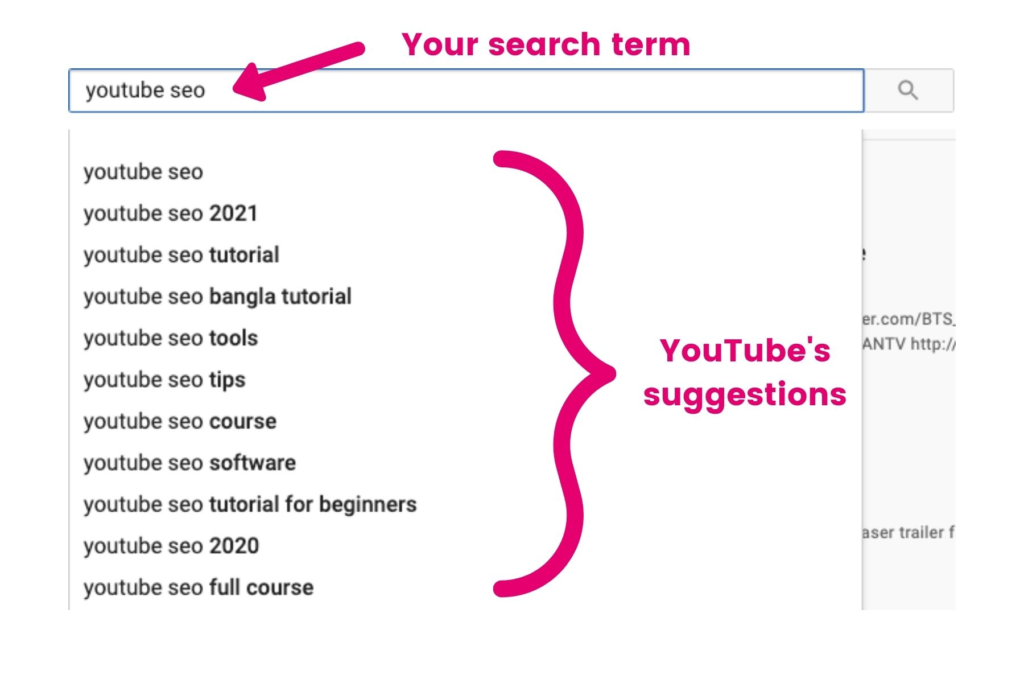
It sounds simple, but there are plenty of powerful features hidden inside YouTube’s search bar. If you type the start of a word or phrase and YouTube can auto-complete it with search terms that reflect what real people want.
These tips can help you plan video titles, ideas and tags that fit viewer intent. It’s fast, it’s free, and it’s remarkably accurate, making it a must-use free YouTube keyword tool.
2. YouTube Keywords Tool by Keyword Tool
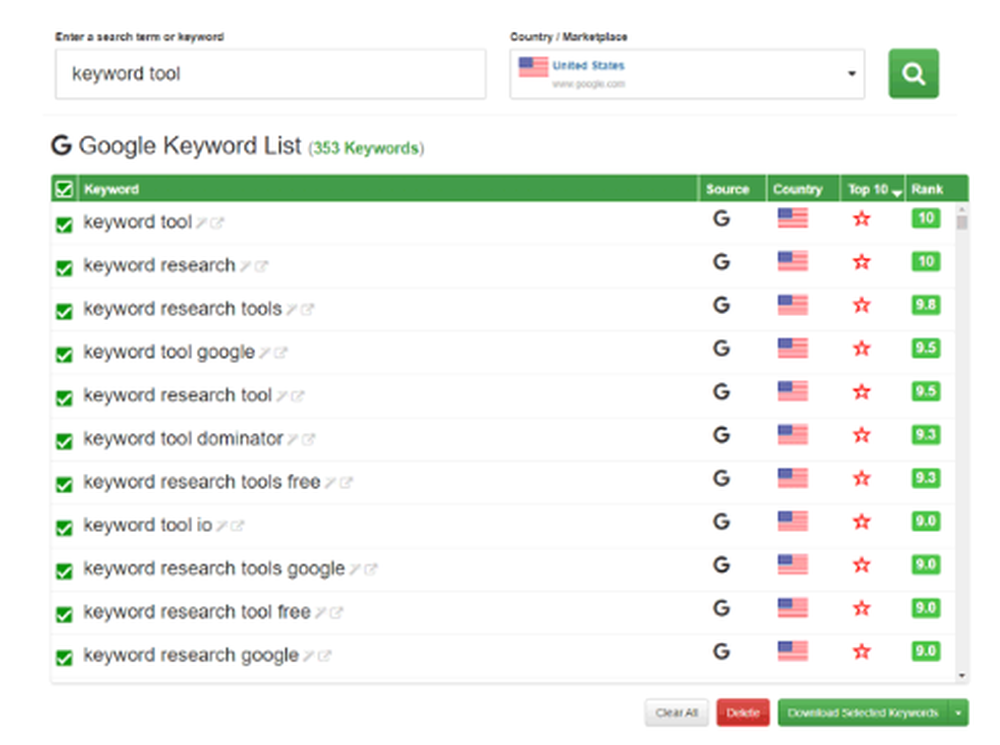
This YouTube keyword research tool, found in keywordtool.io takes it a step further by fetching hundreds of autocomplete suggestions from YouTube.
It even provides search volume, competition, and cost-per-click (CPC) data if you are running ads. It’s great for discovering long-tail keywords you’d never think of on your own.
3. VidIQ – YouTube Keyword Difficulty Checker and SEO Insights
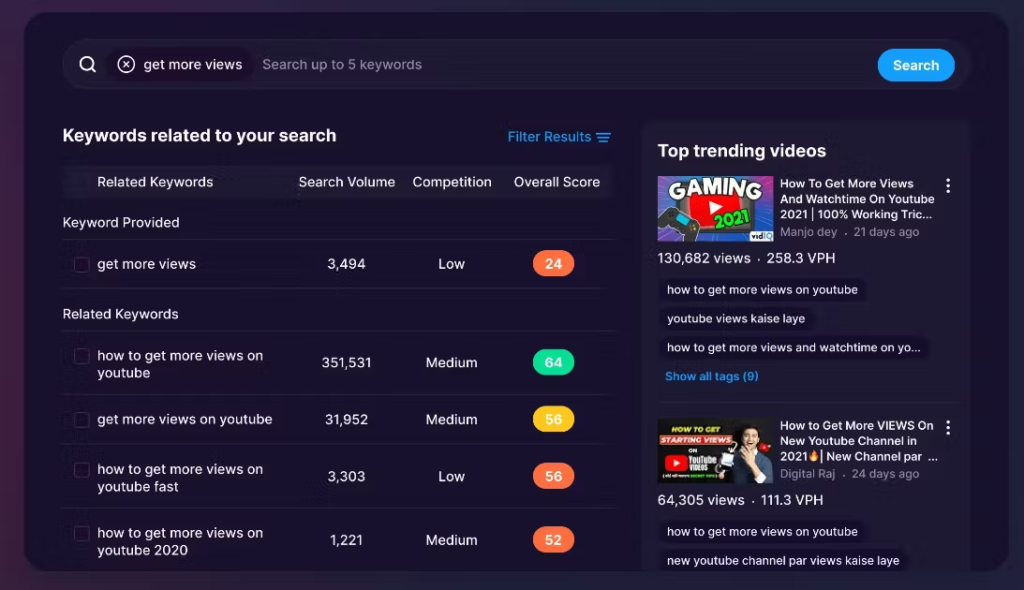
There’s a good reason YouTubers love vidIQ. Not only does it do YouTube SEO keyword research, but it also helps you understand what’s working on YouTube right now.
You’ll get access to search volume, YouTube keyword difficulty checker scores, and tag suggestions, plus insight into what your competitors are up to. The free version is ideal for beginners, while the paid options offer more in-depth analytics.
4. 1-of-10 Best Tool – Compare Multiple YouTube Keyword Options
This tool enables you to compare up to 10 YouTube keywords simultaneously and identify the ones worth targeting. It’s also extremely useful for selecting between video ideas or determining the best approach to take with your content.
It even tells you the search volume and competition so that you can make wiser decisions. Tools like this are invaluable for smart YouTube keyword optimization.
5. TubeBuddy – The Best YouTube Video SEO Tool for Creators

TubeBuddy is a plugin for YouTubers. Its keyword tools can assist you in discovering the best-performing tags, optimizing your video title and monitoring the SEO score in real time upon uploading.
It’s particularly useful for creators who seek YouTube video SEO tools directly inside their YouTube dashboard.
Quick Comparison of the 5 Tools
| Tool | Free option | Best for | Standout feature |
| YouTube search bar | Yes | Quick ideas | Real search suggestions |
| Keyword Tool | Limited | Finding long keywords | Hundreds of ideas at once |
| vidIQ | Yes (limited) | Research and competitor tips | Competition score and tag ideas |
| 1of10 | Check their site | Choosing between ideas | Side-by-side comparison |
| TubeBuddy | Yes (limited) | Improving videos as you upload | SEO score inside YouTube |
How to Find YouTube Keyword Search Volume
Search volume tells you about how many people search for a keyword each month. vidIQ, Keyword Tool, and TubeBuddy all show it.
Keep one thing in mind. These numbers are estimates, and each tool gives a different number. So use them to compare keywords with each other. Don’t treat any one number as exact.
Also, a keyword with lower volume and low competition is often a better pick for a small channel.
How to Check Keyword Competition and YouTube SEO Score
Competition tells you how hard it is to rank for a keyword. vidIQ and TubeBuddy both give you a score for this.
You can also check it yourself. Search the keyword and look at who’s on page one. Big channels with millions of views? It’ll be tough. Small channels? You have a real shot.
To check a single video’s SEO, use the optimization score in TubeBuddy or vidIQ. It looks at your title, description, tags, and more.
How to Check Your YouTube Keyword Ranking
You have two easy options:
- Do it by hand. Open an incognito window and search your keyword on YouTube. See where your video shows up. Your location and watch history can change the results, so treat it as a rough guide.
- Use a tool. vidIQ and TubeBuddy offer rank tracking, mostly on paid plans. It shows how your position changes over time. Check each tool’s latest features before you pay.
Also, if you use an SEO rank tracker for your website, check if it supports YouTube. Some do.
How to Find Keywords Your Competitors Use on YouTube
Looking at your competitors saves you a lot of guesswork. Here’s how:
- Read their titles and descriptions. Open the top videos in your niche. Notice which phrases they repeat.
- Check their tags. vidIQ and TubeBuddy show the tags on any public video.
- Spot the patterns. See which topics get the most views. Then make your own version that’s better or more up to date.
- Visit their website. If they have a blog, the topics there often match their YouTube plan.
Then look for keywords they rank for that you haven’t covered yet. Those are your easiest wins.
Why YouTube SEO Keyword Research Tools Are a Must for Creators
The right keywords can make all the difference between a video that sinks and one that soars. These tools let you see what real people are actually looking for — and allow your content to have a fighting chance of reaching them.
Begin with a simple search in YouTube’s own search bar and then step up your game with tools like vidIQ, TubeBuddy, and Keyword Tool.
If you’re seeking assistance in building your channel with intelligent SEO, reach out to Biztalbox today.
Frequently Asked Questions
1. What is YouTube keyword research?
It means finding the words people search for on YouTube. You then use them in your titles, descriptions, and tags. This helps your videos show up in search and suggested videos.
2. How do I do keyword research for YouTube?
Pick a seed topic and check YouTube’s search suggestions. Then look at search volume and competition in a keyword tool. Study the top videos, and use your keyword in your title, description, tags, and script
3. What are the best YouTube keyword research tools?
Five good ones are the YouTube search bar, Keyword Tool, vidIQ, 1of10, and TubeBuddy. If you’re a beginner, start with the free search bar and the free plans of vidIQ or TubeBuddy.
4. How do I use vidIQ for YouTube keyword research in 2026?
Install the extension and type in a seed keyword. Check the search volume and competition score. Pick low-competition keywords, then look at the tags on top videos for more ideas.
5. How do I find YouTube keyword search volume?
Use vidIQ, Keyword Tool, or TubeBuddy. The numbers are estimates, so use them to compare keywords. Don’t rely on them as exact figures.
6. How do I check keyword competition and YouTube SEO?
Look at the competition score in vidIQ or TubeBuddy. Then check the top results yourself. If small channels rank on page one, the keyword is a good pick.
7. How do I check my YouTube keyword ranking?
Search your keyword in an incognito window and see where your video appears. For regular tracking, use a rank tracker like the one in vidIQ or TubeBuddy.
8. How do I find out what keywords my competitors use on YouTube?
Open their top videos and read the titles and descriptions. Use vidIQ or TubeBuddy to see their tags. Then look for topics they cover that you don’t.
Also Read:- How to Do YouTube SEO: A Step-by-Step Guide to Ranking Videos
Leave a Reply
Your email address will not be published. Required fields are marked *
Comments